| Poster | Thread |
 daveyw daveyw
|  |
Re: External USB HD for AmigaOne XE
Posted on 18-Jun-2013 7:29:10
| | [ #21 ] |
|
|
 |
Regular Member
 |
Joined: 6-Mar-2011
Posts: 276
From: New Zealand | | |
|
| Well, I've had some success.
I bought a USB card from an on-line auction. It was listed as an NEC, but turned out to be a VIA. Tried it anyway, and it looks like its working.
I've successfully copied a 500 MB file. However, it wasn't too swift - I haven't timed it yet, but it would be around 2 minutes. I then copied the same file to my PS3 in about 30 seconds.
I had had a couple of crashes, both times I was doing something while the drive was copying (in one case deleting another file from the source directory)
Any idea how I can tell if a drive is operating in echi or uchi mode?

_________________
---------------
AmigaOne X5000 P5020 2Ghz, OS 4.1
AmigaOne XE G4 800mhz, OS 4.1
A1200T 40Mhz 68040, OS 3.9 |
|
| Status: Offline |
|
|
Hypex
 | |
Re: External USB HD for AmigaOne XE
Posted on 18-Jun-2013 16:10:54
| | [ #22 ] |
|
|
 |
Elite Member
 |
Joined: 6-May-2007
Posts: 11351
From: Greensborough, Australia | | |
|
| @daveyw
That's on old revision earlier than the [OS4] buggy VT6212. So it possibly works fine.
From some calculations I'd say it was working in USB2 mode. Your PS3 is getting about 16MB/s. If we use your figure of 2 minutes or 120 seconds then that is about 4MB/s. Since USB1.1 works at 900KB/s and 500MB would take over 9 minutes at USB1.1 I'd certainly say you are using USB2! 
Apart from timing tests to see what mode or controller it us using check the USB log in T: It will show which one the device is attached to. |
|
| Status: Offline |
|
|
daveyw
| |
Re: External USB HD for AmigaOne XE
Posted on 20-Jun-2013 5:01:15
| | [ #23 ] |
|
|
|
Regular Member
|
Joined: 6-Mar-2011
Posts: 276
From: New Zealand | | |
|
| I have given up trying to get this drive to work. I don't know if the card is buggy, or Amiga OS4.1's USB support is broken, or if I have tried so many times the drive is now damaged.
Whenever I tried to copy alot of files with DOpus 4 onto the drive, it would eventually lock up. It would be faster and get alot further than without the USB card, but the result could be the same.
After a lock-up, I would reboot and try again with DOpus 4. When prompted to overwrite the existing files, I'd select "Skip All". Then DOpus would do just that, "Skip All". I'm pretty sure Skip All means "skip the files that already exist" not "don't bother copying anything at all" ???
I gave up on cross-platform compatiblity and tried to format with SFS. I have now formatted the drive about 6 times. I cannot quick format, it complains "Drive is full" (!!!???) Full Formatting results in this:
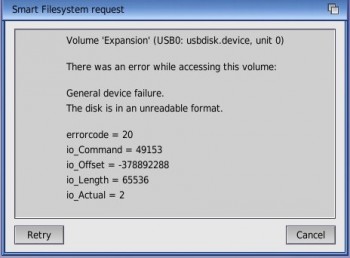
This is the occasional error I get on my hard drive which is why I want to back it up in the first place!
_________________
---------------
AmigaOne X5000 P5020 2Ghz, OS 4.1
AmigaOne XE G4 800mhz, OS 4.1
A1200T 40Mhz 68040, OS 3.9 |
|
| Status: Offline |
|
|
NutsAboutAmiga
| |
Re: External USB HD for AmigaOne XE
Posted on 20-Jun-2013 10:54:57
| | [ #24 ] |
|
|
 |
Elite Member
|
Joined: 9-Jun-2004
Posts: 13047
From: Norway | | |
|
| @daveyw
Quote:
| I don't know if the card is buggy, or Amiga OS4.1's USB support is broken |
USB work well on AmigaONE x1000
Yes the USB is broken on AmigaONE-XE/SE, the USB hardware fix does help improve stability, but even so it's dead slow, can't recommend it, I think part of problem is that it can't keep up when it get overloaded whit data.
Anyway the error message is alarming, the Io_Offset should never be a negative number,
Io_Actual should be abused by the upper 32bit of the 64bit offset, it might be the error requestor is faulty or the that filesystem your using is broken, or maybe it’s the MBR support that can't handle large disks, FAT32 has also a limit on size of partitions
EDIT:
Just noticed it says "Smart FileSystem" in the border of the dialog window, what version of the Smart Filesystem are you useing on your USB drive? Ignore the part about MBR and FAT32.
Last edited by NutsAboutAmiga on 20-Jun-2013 at 11:06 AM.
Last edited by NutsAboutAmiga on 20-Jun-2013 at 11:02 AM.
_________________
http://lifeofliveforit.blogspot.no/
Facebook::LiveForIt Software for AmigaOS |
|
| Status: Offline |
|
|
daveyw
| |
Re: External USB HD for AmigaOne XE
Posted on 20-Jun-2013 18:53:26
| | [ #25 ] |
|
|
|
Regular Member
|
Joined: 6-Mar-2011
Posts: 276
From: New Zealand | | |
|
| @NutsAboutAmiga
SFS version 1.290, SFS/00 . I tried SFS after having so many problems with FAT. I even tried JXFS.
I'm beginning to think it's the card, given that it's a VIA 6202. I have gone back to the seller and asked them to either supply the NEC card they advertised or a refund.
Attached the drive to my Win XP work laptop, formatted OK in NTFS and backed-up the C: drive to a 2 GB file on the USB drive in about 45 minutes no problems. Then installed NTFS on my A1 and was able to copy the 2 GB file very quickly to my HD. If only we had write access on NTFS!
I've also noticed there's a lag on read/writes now even on my PATA HD. I guess it's possible that if the card was buggy it would slow down the entire bus?
But as I said I sometimes get that same error that I mentioned above on my PATA HD. When I first bought it I took it back and they checked it, found nothing wrong. I reduced the speed to UDMA 2 (rated for 6), seems better. I also noticed the other day I don't have SMART enabled on it. _________________
---------------
AmigaOne X5000 P5020 2Ghz, OS 4.1
AmigaOne XE G4 800mhz, OS 4.1
A1200T 40Mhz 68040, OS 3.9 |
|
| Status: Offline |
|
|
Hypex
| |
Re: External USB HD for AmigaOne XE
Posted on 23-Jun-2013 14:39:13
| | [ #26 ] |
|
|
|
Elite Member
|
Joined: 6-May-2007
Posts: 11351
From: Greensborough, Australia | | |
|
| @NutsAboutAmiga
Quote:
| USB work well on AmigaONE x1000 |
It works well as long as you don't do a SCSISpeed test in shell. Which will crash. 
Infact, I found USB to be buggy on the X1000 at times, sometimes in the shell. I recall I couldn't format some sticks at oen stage. Then later it worked. It was a bit flaky.
Perhaps the bugs are fixed. I'll do another SCSISpeed test and see. |
|
| Status: Offline |
|
|
NutsAboutAmiga
| |
Re: External USB HD for AmigaOne XE
Posted on 24-Jun-2013 7:55:21
| | [ #27 ] |
|
|
|
Elite Member
|
Joined: 9-Jun-2004
Posts: 13047
From: Norway | | |
|
| @Hypex
I format my USB sticks in windows, to delete the annoying SanDISK and other crap software pre-installed on USB stick, maybe there is problem formatting it on AmigaOS.
On windows if you want format a USB stick you can do it whit command named diskpart, if your USB stick contains NTFS. Google Diskpart and windows.
If your coping files from workbench or from shell should not make any difference, because copy process has to go through the dos.library and the file system in bout cases before it hit the usbdisk.device.
Can we trust SCSISpeed? Is that program NSD64 / TD64 safe? Some of these old tools might bypass the filesystem, and so it might do harm or change content on the device, and possibly write or read at the wrong blocks, in the best case you get faulty results, in worst case it might destroy something.
Besides there is a maximum read and write limit on flash storage, you might shorten the flash storage lifespan.
Last edited by NutsAboutAmiga on 24-Jun-2013 at 08:03 AM.
_________________
http://lifeofliveforit.blogspot.no/
Facebook::LiveForIt Software for AmigaOS |
|
| Status: Offline |
|
|
Daedalus
| |
Re: External USB HD for AmigaOne XE
Posted on 24-Jun-2013 10:55:38
| | [ #28 ] |
|
|
 |
Super Member
 |
Joined: 14-Jul-2003
Posts: 1680
From: Glasgow - UK, Irish born | | |
|
| I haven't had a problem with my USB hard drive and a generic USB 2.0 card on my XE/G4, but I can't remember what chipset it is. It's not as fast as other systems but far, far faster than USB1.1. My problem however is a lack of available PCI slots since one doesn't work and the others are taken, so I don't use it. Instead I mount it as a network drive and copy it that way. It's also far, far faster than USB1.1, and if you did that with a PC as a host, you could keep the drive in NTFS as the PC actually does the writing.
For me though it is my network hub that's the host, and I would have needed to reformat it to FAT32 anyway. As regards backing up, I have a second HD inside my A1 which I back up to frequently using OnyxSoft's Backup, and then from time to time I use Cranu to archive important drawes before I put them on the external hard drive. That way all the permissions are saved, and I can use the network drive to back up my other (non-Amigoid) machines too. _________________
RobTheNerd.com | InstallerGen | SMBMounter | Atoms-X |
|
| Status: Offline |
|
|
Hypex
| |
Re: External USB HD for AmigaOne XE
Posted on 25-Jun-2013 15:39:10
| | [ #29 ] |
|
|
|
Elite Member
|
Joined: 6-May-2007
Posts: 11351
From: Greensborough, Australia | | |
|
| |
| Status: Offline |
|
|
Hypex
| |
Re: External USB HD for AmigaOne XE
Posted on 26-Jun-2013 14:36:34
| | [ #30 ] |
|
|
|
Elite Member
|
Joined: 6-May-2007
Posts: 11351
From: Greensborough, Australia | | |
|
| @Daedalus
See, you have some gereric card and your USB2 works! This is frustraing for people like daveyw. And also myself where I bought a generic card that doesn't work with OS4 EHCI.
I have also tested a network drive as being faster than USB1.1. Here I get about twice the speed at about 2MB/s. Which seems too slow over 100Mb wire. I expect the network to get USB2 speeds!
The only problem with a network drive, at least n Amiga, is stuffing around setting it up or mounting it. You either need Samba setup to use it the slow easy way, or FTP to it the faster but more cumbersome way. |
|
| Status: Offline |
|
|
danwood
| |
Re: External USB HD for AmigaOne XE
Posted on 26-Jun-2013 15:14:41
| | [ #31 ] |
|
|
 |
Super Member
|
Joined: 30-Sep-2008
Posts: 1075
From: Unknown | | |
|
| @daveyw
Quote:
| I'm beginning to think it's the card... |
I've pretty much had EXACTLY the same experiences as you trying to back up my A1XE, I've damaged two external drives (even Windows won't recognise or fix them now) in the last week, I've had the same errors as you show above as well.
I've tried 4 different USB 2 cards with my A1XE, two NEC two VIA, the VIA one is the more stable but only works in 1.1 mode, and even then regularly corrupts usb pen-drives etc.
In my experience, USB is still very buggy/unstable on OS4, I have virtually given up with it apart from keyboard/mouse on OS4.1. I still wish they'd swallow their pride and just implement the (open source) Poseidon USB stack which works great for me on MorphOS.
I just got another IDE drive and hooked it up inside my AmigaOne and copied files that way, a 160GIG IDE drive is only around $20 on ebay these days. Last edited by danwood on 27-Jun-2013 at 08:19 AM.
Last edited by danwood on 27-Jun-2013 at 08:19 AM.
Last edited by danwood on 26-Jun-2013 at 03:16 PM.
|
|
| Status: Offline |
|
|
NutsAboutAmiga
| |
Re: External USB HD for AmigaOne XE
Posted on 26-Jun-2013 16:14:14
| | [ #32 ] |
|
|
|
Elite Member
|
Joined: 9-Jun-2004
Posts: 13047
From: Norway | | |
|
| @danwood
If you have lots stuff plugged into your computer you're bound to have more than one device sharing IRQ, I don't know if this effect stability, or if drivers work whit shared IRQ.
Anyway USB is not really an IRQ driven system, but software driven system, where system requests data as interval.
I can only say that when I copy from to my X1000 is have no problems, it's fast and efficient. Trying to do the same on my old XE can result in read and write errors.
I don't see Pegasus II, Sam460, Sam440 users complain, it's not an AmigaOS4 issue it more likely XE issue. _________________
http://lifeofliveforit.blogspot.no/
Facebook::LiveForIt Software for AmigaOS |
|
| Status: Offline |
|
|
Swoop
 | |
Re: External USB HD for AmigaOne XE
Posted on 26-Jun-2013 19:24:18
| | [ #33 ] |
|
|
 |
Elite Member
|
Joined: 20-Jun-2003
Posts: 2163
From: Long Riston, East Yorkshire | | |
|
| @NutsAboutAmiga
I have a nec usb 2 card in my A1XE-G3, and it's great.
I even bought a 7 way adapter off of ebay, and just for fun filled it with usb sticks and my A1 handled it fine. I even played an avi file from one of them, while adding and checking the contents of the various sticks. _________________
Peter Swallow.
A1XEG3-800 [IBM 750FX PowerPC], running OS4.1FE, using ac97 onboard sound.
"There are 10 types of people in the world: those who understand binary, and those who don't." |
|
| Status: Offline |
|
|
daveyw
| |
Re: External USB HD for AmigaOne XE
Posted on 27-Jun-2013 6:02:36
| | [ #34 ] |
|
|
|
Regular Member
|
Joined: 6-Mar-2011
Posts: 276
From: New Zealand | | |
|
| @danwood
Actually, I am beginning to think it is OS4 rather than the card.
I have borrowed a Sam 460ex and plugged my external drive into that, with the same result - drive errors (there you go NutsAboutAmiga, a Sam user has complained!  ) )
I am thinking now the only realistic way to back-up is to go eSATA, as someone suggested earlier.
_________________
---------------
AmigaOne X5000 P5020 2Ghz, OS 4.1
AmigaOne XE G4 800mhz, OS 4.1
A1200T 40Mhz 68040, OS 3.9 |
|
| Status: Offline |
|
|
danwood
| |
Re: External USB HD for AmigaOne XE
Posted on 27-Jun-2013 8:13:45
| | [ #35 ] |
|
|
|
Super Member
|
Joined: 30-Sep-2008
Posts: 1075
From: Unknown | | |
|
| @NutsAboutAmiga
Quote:
f you have lots stuff plugged into your computer you're bound to have more than one device sharing IRQ, I don't know if this effect stability, or if drivers work whit shared IRQ.
Anyway USB is not really an IRQ driven system, but software driven system, where system requests data as interval.
I can only say that when I copy from to my X1000 is have no problems, it's fast and efficient. Trying to do the same on my old XE can result in read and write errors.
I don't see Pegasus II, Sam460, Sam440 users complain, it's not an AmigaOS4 issue it more likely XE issue.
|
Would you class a mouse, keyboard and a USB drive as "lots of stuff"? That's all I have tried plugged in, three devices, I shouldn't have to unplug my keyboard to copy files on to a USB stick though surely?!
Others in this thread have said they've had problems on X1000 and Sams too though, and note I am NOT using the built in USB on the XE (Which I know is flaky), I have tried 4 different PCI USB cards now, none of which have given satisfactory results. |
|
| Status: Offline |
|
|
daveyw
| |
Re: External USB HD for AmigaOne XE
Posted on 27-Jun-2013 9:28:23
| | [ #36 ] |
|
|
|
Regular Member
|
Joined: 6-Mar-2011
Posts: 276
From: New Zealand | | |
|
| @daveyw
A thought has occured to me... every USB card I've tried has the notch on the PCI interface on the end nearest to the inside of the case. That's a 5v card, right? And you're only supposed to used 3.3v cards in the A1? _________________
---------------
AmigaOne X5000 P5020 2Ghz, OS 4.1
AmigaOne XE G4 800mhz, OS 4.1
A1200T 40Mhz 68040, OS 3.9 |
|
| Status: Offline |
|
|
Spectre660
| |
Re: External USB HD for AmigaOne XE
Posted on 27-Jun-2013 11:45:34
| | [ #37 ] |
|
|
 |
Elite Member
|
Joined: 4-Jun-2005
Posts: 3918
From: Unknown | | |
|
| @daveyw
Could be the size of the Hard Drive.
I have not tried any thing greater than 500GB.
Works for me. No complaints. Both Sam models.
Quote:
daveyw wrote:
@danwood
Actually, I am beginning to think it is OS4 rather than the card.
I have borrowed a Sam 460ex and plugged my external drive into that, with the same result - drive errors (there you go NutsAboutAmiga, a Sam user has complained! )
I am thinking now the only realistic way to back-up is to go eSATA, as someone suggested earlier.
|
_________________
Sam460ex : Radeon Rx550 Single slot Video Card : SIL3112 SATA card |
|
| Status: Offline |
|
|
danwood
| |
Re: External USB HD for AmigaOne XE
Posted on 27-Jun-2013 20:54:24
| | [ #38 ] |
|
|
|
Super Member
|
Joined: 30-Sep-2008
Posts: 1075
From: Unknown | | |
|
| @Spectre660
Nah I've tried with a 1gb USB pen and same result. |
|
| Status: Offline |
|
|
Spectre660
| |
Re: External USB HD for AmigaOne XE
Posted on 28-Jun-2013 0:15:50
| | [ #39 ] |
|
|
|
Elite Member
|
Joined: 4-Jun-2005
Posts: 3918
From: Unknown | | |
|
| @danwood
Ok so I looks like things wont work on the A1.
But something else may be causing the problem on the Sam460ex.
I have had problems with my Sam440ep-flex and a Seagate SATA 500GB drive
on the onboard sii3114.Replaced it with a 500GB Western Digital drive.
The Seagate is now in my dual drive external USB Harddrive case,
formated as fat32 and is thus far working ok .
Quote:
danwood wrote:
@Spectre660
Nah I've tried with a 1gb USB pen and same result. |
_________________
Sam460ex : Radeon Rx550 Single slot Video Card : SIL3112 SATA card |
|
| Status: Offline |
|
|
DWolfman
| |
Re: External USB HD for AmigaOne XE
Posted on 28-Jun-2013 10:49:31
| | [ #40 ] |
|
|
 |
Super Member
|
Joined: 18-Jun-2003
Posts: 1444
From: Leavenworth, KS USA | | |
|
| I know that SFS/00 partitions won't work correctly if they are larger than somewhere around 128 GB. You have to use SFS/02 instead if you want partitions larger than 128 GB. In some cases you could get those negative offsets if you tried to use SFS/00 for partitions larger than 128 GB.
In fact, read the FAQ file from the SFS LHA file. You'll find everything you need to know about it explained in the first question's answer.
But I agree, the A1-XE's on-board USB is VERY buggy. I gave up trying to get it to work with any kind of mass-storage devices a LONG time ago. Never even considered getting any add-on USB cards either, since all I needed was a good network connection to the Samba shares on my Linux server.
I noticed in an earlier post, someone suggested to use an eSATA connection to the external drive instead. I'm thinking that would be a much faster and more reliable way to go about doing this.
As for FAT32 formatting, the standard 4096 cluster size it uses is good for up to 16 TB partitions, so you could do that in one partition. _________________
|
|
| Status: Offline |
|
|




 22 crawler(s) on-line.
 95 guest(s) on-line.
 0 member(s) on-line.


