| Poster | Thread |
 phoenixkonsole phoenixkonsole
|  |
Re: AROS meets Linux = AEROS
Posted on 11-Jul-2012 21:23:24
| | [ #1 ] |
|
|
 |
Super Member
 |
Joined: 8-Nov-2009
Posts: 1775
From: Unknown | | |
|
| 116 minutes...
_________________
AROS Broadway - AEROS - Aminux - AmiCloud - indieGO! Appstore - AmiWallet - VAN lossless video codec - AMC Amiga media Center -KrypUnite - LibertyNet - MinX - amigaNX
|
|
| Status: Offline |
|
|
clusteruk
 | |
Re: AROS meets Linux = AEROS
Posted on 11-Jul-2012 21:25:54
| | [ #2 ] |
|
|
 |
Super Member
|
Joined: 20-Nov-2008
Posts: 1544
From: Marston Moretaine, England | | |
|
| |
| Status: Offline |
|
|
phoenixkonsole
| |
Re: AROS meets Linux = AEROS
Posted on 11-Jul-2012 21:29:42
| | [ #3 ] |
|
|
|
Super Member
|
Joined: 8-Nov-2009
Posts: 1775
From: Unknown | | |
|
| Ah.. maybe I should make clear that ARM version differs a lot from x86 : )
_________________
AROS Broadway - AEROS - Aminux - AmiCloud - indieGO! Appstore - AmiWallet - VAN lossless video codec - AMC Amiga media Center -KrypUnite - LibertyNet - MinX - amigaNX
|
|
| Status: Offline |
|
|
tomazkid
| |
Re: AROS meets Linux = AEROS
Posted on 11-Jul-2012 22:00:29
| | [ #4 ] |
|
|
 |
Team Member
 |
Joined: 31-Jul-2003
Posts: 11694
From: Kristianstad, Sweden | | |
|
| Is it a live-cd too or just for the installation?
_________________
Site admins are people too..pooff!
|
|
| Status: Offline |
|
|
phoenixkonsole
| |
Re: AROS meets Linux = AEROS
Posted on 11-Jul-2012 22:03:51
| | [ #5 ] |
|
|
|
Super Member
|
Joined: 8-Nov-2009
Posts: 1775
From: Unknown | | |
|
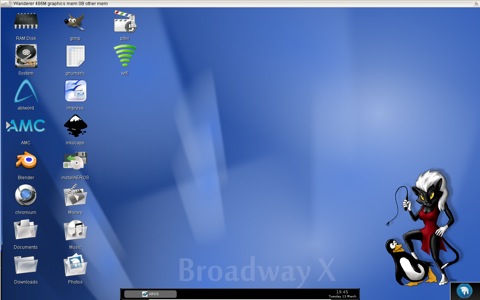
| Live CD. But in livemode it is running only in 800x600 because it is the lowest common denominator.
You can run the installer with double click on the icon on wanderer.
_________________
AROS Broadway - AEROS - Aminux - AmiCloud - indieGO! Appstore - AmiWallet - VAN lossless video codec - AMC Amiga media Center -KrypUnite - LibertyNet - MinX - amigaNX
|
|
| Status: Offline |
|
|
klx300r
| |
Re: AROS meets Linux = AEROS
Posted on 11-Jul-2012 22:36:53
| | [ #6 ] |
|
|
 |
Elite Member
 |
Joined: 4-Mar-2008
Posts: 3896
From: Toronto, Canada | | |
|
| |
| Status: Offline |
|
|
nikosidis
| |
Re: AROS meets Linux = AEROS
Posted on 11-Jul-2012 23:06:55
| | [ #7 ] |
|
|
 |
Cult Member
 |
Joined: 9-Dec-2008
Posts: 998
From: Norway, Oslo | | |
|
| Whow, this looks great. Thx for your hard work Phoenix. I will try it tomorrow. |
|
| Status: Offline |
|
|
eXec
| |
Re: AROS meets Linux = AEROS
Posted on 11-Jul-2012 23:24:42
| | [ #8 ] |
|
|
 |
Cult Member
|
Joined: 21-Jun-2004
Posts: 956
From: Burkina Faso | | |
|
| Bravo!
This is a way to go!
Finally something usable...
DL in progress!

_________________
____
...administration is for serious people only....
|
|
| Status: Offline |
|
|
AmigaMac
| |
Re: AROS meets Linux = AEROS
Posted on 12-Jul-2012 0:12:14
| | [ #9 ] |
|
|
 |
Super Member
|
Joined: 26-Oct-2002
Posts: 1177
From: 3rd Rock from the Sun! | | |
|
| Shouldn't it be called AROX? 
_________________
|
|
| Status: Offline |
|
|
klx300r
| |
Re: AROS meets Linux = AEROS
Posted on 12-Jul-2012 2:40:02
| | [ #10 ] |
|
|
|
Elite Member
|
Joined: 4-Mar-2008
Posts: 3896
From: Toronto, Canada | | |
|
| @ AmigaMac
I say ARUX- ARoslinUX
_________________
____________________________
c64-2sids, A1000, A1200T-060@50(finally working!),A4000-CSMKIII
! My Master Miggies- Amiga 1000 & AmigaOne X1000 !
mancave-ramblings
X1000 I BELIEVE 
|
|
| Status: Offline |
|
|
g_kraszewski
| |
Re: AROS meets Linux = AEROS
Posted on 12-Jul-2012 5:13:11
| | [ #11 ] |
|
|
 |
Regular Member
 |
Joined: 3-Sep-2010
Posts: 343
From: Unknown | | |
|
| Allows you to run AROS apps and games too, most of them come from Amiga
Oh, really?
_________________
RastPort
|
|
| Status: Offline |
|
|
KimmoK
| |
Re: AROS meets Linux = AEROS
Posted on 12-Jul-2012 6:02:48
| | [ #12 ] |
|
|
 |
Elite Member
|
Joined: 14-Mar-2003
Posts: 5214
From: Ylikiiminki, Finland | | |
|
| GREAT! I will try this!
btw:
This seems to have a lot more "Commodore" in it than any C=USA offering so far.
AEROS implements the AmigaOS API developed by the real CBM.
_________________
- KimmoK
// For freedom, for honor, for AMIGA
//
// Thing that I should find more time for: CC64 - 64bit Community Computer?
|
|
| Status: Offline |
|
|
TrevorDick
 | |
Re: AROS meets Linux = AEROS
Posted on 12-Jul-2012 7:42:26
| | [ #13 ] |
|
|
 |
Elite Member
|
Joined: 30-Dec-2004
Posts: 2678
From: Wellington | | |
|
| Hmmm!
I only get a totally blank OpenBox screen with the liveCD (also with failsafe mode). I can access the menus and run programs but its not very exciting.
If I exit this I am given the choice of logging back into one of the other Desktops but it needs a user name and password (which don't appear tohave been provided)?)
If I try to install to a HDD, nothing happens?
What am I doing wrong?
Thanks,
TrevorD
EDIT: Update - just read the installation instructions - it seems the iso is only a Demo and only works properly on a Ares One PC. Good job I have one!  Anyway fired up and running as a live CD. Obviously the 800x600 screen does not look to good on a 1980x1050 monitor. Interesting concept though. I've also just noticed about the installation from Wandered. I would prefer to install it on another PC and not overwrite my Icaros Desktop installation. I'll see if it will install with VirtualBox. Anyway fired up and running as a live CD. Obviously the 800x600 screen does not look to good on a 1980x1050 monitor. Interesting concept though. I've also just noticed about the installation from Wandered. I would prefer to install it on another PC and not overwrite my Icaros Desktop installation. I'll see if it will install with VirtualBox.
Update 2: The iso dosen't appear to like either VirtualBox under Linux or VMWare under Windows so am not able to install to get a real feel for the software. Black openbox type screen in both cases. Linux programs accessible but.... Last edited by TrevorDick on 12-Jul-2012 at 11:11 AM.
Last edited by TrevorDick on 12-Jul-2012 at 08:52 AM.
Last edited by TrevorDick on 12-Jul-2012 at 08:41 AM.
Last edited by TrevorDick on 12-Jul-2012 at 08:25 AM.
Last edited by TrevorDick on 12-Jul-2012 at 08:22 AM.
_________________
No, I don't need no reason, I'm just breezin'
|
|
| Status: Offline |
|
|
clusteruk
| |
Re: AROS meets Linux = AEROS
Posted on 12-Jul-2012 8:03:45
| | [ #14 ] |
|
|
|
Super Member
|
Joined: 20-Nov-2008
Posts: 1544
From: Marston Moretaine, England | | |
|
| @PhoenixConsole
Quote:
| Ah.. maybe I should make clear that ARM version differs a lot from x86 : ) |
Let me explain English sarcasm
Have to say that this is a great way of bringing new users to the Amiga family so well done Pascal.Last edited by clusteruk on 12-Jul-2012 at 08:08 AM.
_________________
Amiga 1000, 3000D Toaster, Checkmate A1500 Plus
http://www.checkmate1500plus.com/
|
|
| Status: Offline |
|
|
phoenixkonsole
| |
Re: AROS meets Linux = AEROS
Posted on 12-Jul-2012 9:25:33
| | [ #15 ] |
|
|
|
Super Member
|
Joined: 8-Nov-2009
Posts: 1775
From: Unknown | | |
|
| Hi Trevor,
please give your "virtual PC" at least 640MB RAM, better 1024.
AROS gets 512MB assigned. So with less it won't boot from CD.
Linux needs a bit too. So 640MB should work.
I made the video on virtuabox. So it must work.
The livemode is just to run the installer..
Please watch the how to install video and have a look at the FAQ.
EDIT: Create in Virtuabox a new "debian" system.
This way you can add the guest additions automatically via VB gui. Last edited by phoenixkonsole on 12-Jul-2012 at 10:23 AM.
_________________
AROS Broadway - AEROS - Aminux - AmiCloud - indieGO! Appstore - AmiWallet - VAN lossless video codec - AMC Amiga media Center -KrypUnite - LibertyNet - MinX - amigaNX
|
|
| Status: Offline |
|
|
TrevorDick
| |
Re: AROS meets Linux = AEROS
Posted on 12-Jul-2012 11:08:20
| | [ #16 ] |
|
|
|
Elite Member
|
Joined: 30-Dec-2004
Posts: 2678
From: Wellington | | |
|
| Thanks
I will give it another try.
TrevorD
_________________
No, I don't need no reason, I'm just breezin'
|
|
| Status: Offline |
|
|
maz77
| |
Re: AROS meets Linux = AEROS
Posted on 12-Jul-2012 11:38:48
| | [ #17 ] |
|
|
 |
Member
 |
Joined: 5-Sep-2006
Posts: 31
From: germany | | |
|
| i have a question. when a linux program is launched from aeros can it use more then one cpu core and can it use a probitary linux graphic driver with full 3d support? |
|
| Status: Offline |
|
|
royleith
| |
Re: AROS meets Linux = AEROS
Posted on 12-Jul-2012 11:44:47
| | [ #18 ] |
|
|
|
Cult Member
|
Joined: 31-Jul-2003
Posts: 766
From: UK | | |
|
| This is a disaster. It is running well on my Raspberry Pi and I have already wasted hours poking around with it. It seems much more responsive than the other window managers on the Raspi.
Just in case you are stuck;
ID: pi
Password: raspberry
sudo passwd
Enter password raspberry
I promise to return to Raspbian later today after I have got a full screen and overclocking in AEROS. I might waste a little more time getting a higher res screen in AEROS.
This is a great bit of work and I will be using it as my AROS playpen.
Regards
Roy Leith |
|
| Status: Offline |
|
|
phoenixkonsole
| |
Re: AROS meets Linux = AEROS
Posted on 12-Jul-2012 11:57:22
| | [ #19 ] |
|
|
|
Super Member
|
Joined: 8-Nov-2009
Posts: 1775
From: Unknown | | |
|
| @maz77
Yes, LInux apps have full access to all cores, all ram and all attached devices.
AROS apps are single core only.. AROS itself is running as single process.
We will soon allow to run multiple "single" AROS processes on different cores.
So every singlecore app runs on an dedicated core.
But basically it is just a toy and no real solution. But it works..
_________________
AROS Broadway - AEROS - Aminux - AmiCloud - indieGO! Appstore - AmiWallet - VAN lossless video codec - AMC Amiga media Center -KrypUnite - LibertyNet - MinX - amigaNX
|
|
| Status: Offline |
|
|
phoenixkonsole
| |
Re: AROS meets Linux = AEROS
Posted on 12-Jul-2012 12:04:36
| | [ #20 ] |
|
|
|
Super Member
|
Joined: 8-Nov-2009
Posts: 1775
From: Unknown | | |
|
| For Pi users again:
"sudo Xorg -configure"
than "sudo nano /etc/X11/xorg.config"
change the resolution to something fitting your Screen (1280x1024 or 1980x1080)
AROS doesn't autoresize on ARM, so you need to change Screenprefs in AROS manually)
press "ctrl o" to overwrite xorg.conf
press "ctrl x" to quit nano
type "startx"
///////
Sorry have no Pi, so a bit handwork is needed ; ) Last edited by phoenixkonsole on 12-Jul-2012 at 12:05 PM.
_________________
AROS Broadway - AEROS - Aminux - AmiCloud - indieGO! Appstore - AmiWallet - VAN lossless video codec - AMC Amiga media Center -KrypUnite - LibertyNet - MinX - amigaNX
|
|
| Status: Offline |
|
|


 22 crawler(s) on-line.
 95 guest(s) on-line.
 0 member(s) on-line.