| Poster | Thread |
 Moxee Moxee
 |  |
Re: AmiPad 2.0
Posted on 14-Jul-2012 23:40:49
| | [ #1 ] |
|
|
 |
Team Member
 |
Joined: 20-Aug-2003
Posts: 6291
From: County Yakima, WA State, USA | | |
|
| Thanks for the update. Also for posting as a News Article.
__________
Moxee
_________________
Moxee
AmigaOne X1000
AmigaOne XE G4
I'd agree with you, but then we'd both be wrong.
|
|
| Status: Offline |
|
|
opi
 | |
Re: AmiPad 2.0
Posted on 15-Jul-2012 14:40:25
| | [ #2 ] |
|
|
 |
Team Member
|
Joined: 2-Mar-2005
Posts: 2752
From: Poland | | |
|
| Can you explain it to me? From what I understand your program display "tablet like" window with icons that calls web-browser. Is there anything more to it?
_________________
OpenWindows Initiative. Port PS3 hardware to bananas. For free. Join today and receive expired $50 cupon from AI!
|
|
| Status: Offline |
|
|
sicky
| |
Re: AmiPad 2.0
Posted on 15-Jul-2012 15:05:10
| | [ #3 ] |
|
|
 |
Elite Member
 |
Joined: 11-Mar-2003
Posts: 2843
From: Essex, UK | | |
|
| When I run the program and click on one of the icons, MUIOWB gets launched as expected but doesn't go to address. How do I set-up OpenURL prefs to correct this, ie: what settings do I need to set?
_________________
SAM 460 with 2GB or RAM, 1000GB HD, 4 port SATA, DVDRW drive and Radeon HD 4650 GFX card.
|
|
| Status: Offline |
|
|
amigang
| |
Re: AmiPad 2.0
Posted on 15-Jul-2012 17:23:06
| | [ #4 ] |
|
|
 |
Elite Member
|
Joined: 12-Jan-2005
Posts: 2024
From: Cheshire, England | | |
|
| 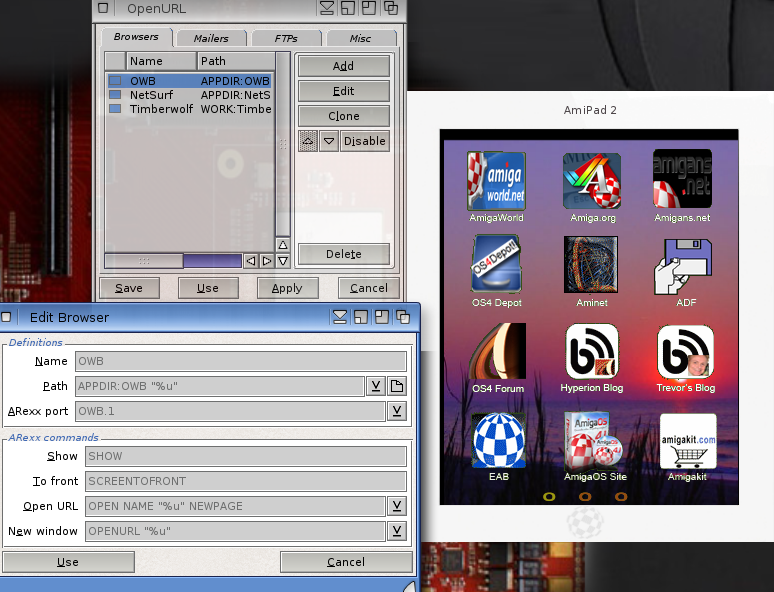
Hope the above image helps with the setting for OpenURL, you can get it from here and make sure you have the pref set up. I believe this is part of the OS from 4.1 update 2, someone correct me if I'm wrong, I'm sure I read that some where.
http://www.os4depot.net/index.php?function=showfile&file=network/misc/openurl.lha
@opi
Basically your spot on, its not an amazing app, this is after all my first app made on hollywood, maybe the videos I made slightly over does it, but this is basically what Apple, Google and Microsoft are pertty much doing, making a pretty GUI with "apps" slightly redesigned in said GUI but basically its just web sites. The funny thing is just a few months ago one of my mates was amazed by a Fat Booth app that basically makes you look fat they paid £2 for it, well in my "app" you can basically do the same thing via http://www.photofunia.com/ and a lot more for free and it all works on Amiga browers.
I think web apps could really help Amiga users fill the void with native apps, and why not have a slightly more fancy way of lanuching these apps.
Last edited by amigang on 15-Jul-2012 at 05:32 PM.
Last edited by amigang on 15-Jul-2012 at 05:25 PM.
Last edited by amigang on 15-Jul-2012 at 05:25 PM.
_________________
AmigaNG, YouTube, LeaveReality Studio
|
|
| Status: Offline |
|
|
Fred_AROS
| |
Re: AmiPad 2.0
Posted on 15-Jul-2012 21:47:42
| | [ #5 ] |
|
|
 |
Regular Member
 |
Joined: 7-Jul-2011
Posts: 136
From: Unknown | | |
|
| Hmmmm, I set the OpenURL settings just like above but here no OWB launches, nothing happens when klicking on the AmiPad icons ... I'm a bit confused here .... |
|
| Status: Offline |
|
|
tommysammy
| |
Re: AmiPad 2.0
Posted on 16-Jul-2012 4:46:51
| | [ #6 ] |
|
|
 |
Cult Member
 |
Joined: 20-Jan-2010
Posts: 662
From: Isselburg,Germany | | |
|
| Same here does not work 
_________________
Amiga600/Vampire2/PrismaMegaMix
|
|
| Status: Offline |
|
|
sicky
| |
Re: AmiPad 2.0
Posted on 16-Jul-2012 14:27:54
| | [ #7 ] |
|
|
|
Elite Member
|
Joined: 11-Mar-2003
Posts: 2843
From: Essex, UK | | |
|
| @amigang
Quote:
| Hope the above image helps with the setting for OpenURL, you can get it from here and make sure you have the pref set up. I believe this is part of the OS from 4.1 update 2, someone correct me if I'm wrong, I'm sure I read that some where. |
With your settings it still just launches MUIOWB but doen't try to go to the site the App wants it to go to!
_________________
SAM 460 with 2GB or RAM, 1000GB HD, 4 port SATA, DVDRW drive and Radeon HD 4650 GFX card.
|
|
| Status: Offline |
|
|
amigang
| |
Re: AmiPad 2.0
Posted on 16-Jul-2012 17:20:28
| | [ #8 ] |
|
|
|
Elite Member
|
Joined: 12-Jan-2005
Posts: 2024
From: Cheshire, England | | |
|
| |
| Status: Offline |
|
|
Tomppeli
| |
Re: AmiPad 2.0
Posted on 16-Jul-2012 22:10:33
| | [ #9 ] |
|
|
 |
Super Member
 |
Joined: 18-Jun-2004
Posts: 1652
From: Home land of Santa, sauna, sisu and salmiakki | | |
|
| Edit:
After installing OpenUrl from the depot nothing happens when clicking the icons. You should use UrlOpen instead (if it's possible). Last edited by Tomppeli on 16-Jul-2012 at 10:17 PM.
Last edited by Tomppeli on 16-Jul-2012 at 10:16 PM.
Last edited by Tomppeli on 16-Jul-2012 at 10:13 PM.
_________________
Rock lobster bit me. My Workbench has always preferences. X1000 + AmigaOS4.1 FE
"Anyone can build a fast CPU. The trick is to build a fast system." -Seymour Cray
|
|
| Status: Offline |
|
|
Epsilon
| |
Re: AmiPad 2.0
Posted on 17-Jul-2012 4:51:09
| | [ #10 ] |
|
|
 |
Regular Member
|
Joined: 29-Apr-2009
Posts: 457
From: Adelaide, Australia | | |
|
| @amigang
I was banging my head against a wall as to why AmiPad 1 & 2 didn't work. 
Finally, today I worked out why this wasn't working for me on the X1000.
I had installed OpenURL as needed, but I was configuring the URL prefs program in prefs thinking it was OpenURL's when it isn't!
I didn't know until reading this thread today that URLOpen is built in to AmigaOS4 and so it has a prefs program too! I then realised that openurl has it's own prefs program hidden behind some icons in prefs - duh!
I am still quite new to AmigaOS4...
As mentioned URL prefs is used by URLOpen, built into AmigaOS. After realising this I tested URLOpen in the Shell - it worked fine to launch website in MUI-OWB which proved my config was correct, just set in the wrong place for AmiPad...
Basically from the openurl library download you need to install the openurl program prefs in sys:prefs, and also the openurl program in c: I didn't replace openurl.library as the version already in libs for URLOpen is the same version.
Then you need to set the openurl Browser and ARexx prefs like amigang showed above. I changed the path to sys:internet/muiowb/owb for my X1000. I click the box to the left of OWB in the Browser tab to be green to enable the browser. I then tested c:openurl from the shell and it worked to go to Amigaworld's website. I then tried AmiPad and clicking the icons then worked for me using MUI-OWB!
I admit the AmiPad application looks quite pretty and it got me interested enough to try it out. It's function from what I see is a Browser URL favourites with clickable icon stored together in a ipad tablet form for easier navigation.
Not sure it works for me since the tablet form is difficult to place on the desktop - Can you save it's position on the desktop for example? Perhaps as a dockie that can expand into the amipad tablet when clicked...and being able to add urls and icons of your own to it - then I can see it being quite useful and integrated.
Thanks for the work in making AmiPad - I hope to see some further enhancements!

Catcha,
Epsilon Last edited by Epsilon on 17-Jul-2012 at 04:58 AM.
Last edited by Epsilon on 17-Jul-2012 at 04:57 AM.
Last edited by Epsilon on 17-Jul-2012 at 04:57 AM.
Last edited by Epsilon on 17-Jul-2012 at 04:56 AM.
|
|
| Status: Offline |
|
|
Tomppeli
| |
Re: AmiPad 2.0
Posted on 18-Jul-2012 18:25:56
| | [ #11 ] |
|
|
|
Super Member
|
Joined: 18-Jun-2004
Posts: 1652
From: Home land of Santa, sauna, sisu and salmiakki | | |
|
| @Epsilon
Quote:
| Perhaps as a dockie that can expand into the amipad tablet when clicked...and being able to add urls and icons of your own to it - then I can see it being quite useful and integrated. |
Maybe it will not expand itself to Amipad but have you tried to add Minimizer docky (in Utilities/Dockies) into one of your Amidock panels ?
Also have you tested this one ?
@amigang
I made a small program called "MiniAmi" once trying to mimic Symbian interface of some Nokia cell phones. Apps running on it would have been as plugins. I didn't bother to release it. I wanted to test ideas of small devices only.
_________________
Rock lobster bit me. My Workbench has always preferences. X1000 + AmigaOS4.1 FE
"Anyone can build a fast CPU. The trick is to build a fast system." -Seymour Cray
|
|
| Status: Offline |
|
|
klx300r
| |
Re: AmiPad 2.0
Posted on 19-Jul-2012 19:33:34
| | [ #12 ] |
|
|
 |
Elite Member
|
Joined: 4-Mar-2008
Posts: 3837
From: Toronto, Canada | | |
|
| @ amigang
nice that Hollywood Designer can create such an app. Request for next version, to be useful to me though I'd need to be able to modify the different website links to those that suit me. I know I can do this by going into the Holywood script and changing it from there but for the end user this should be done via the app settings perhaps
_________________
____________________________
c64-2sids, A1000, A1200T-060@50(finally working!),A4000-CSMKIII
! My Master Miggies- Amiga 1000 & AmigaOne X1000 !
mancave-ramblings
X1000 I BELIEVE 
|
|
| Status: Offline |
|
|
amigang
| |
Re: AmiPad 2.0
Posted on 20-Jul-2012 9:37:27
| | [ #13 ] |
|
|
|
Elite Member
|
Joined: 12-Jan-2005
Posts: 2024
From: Cheshire, England | | |
|
| Thanks for your comments guys
Version 3 should have
New and improved apps icons graphics
At least an extra 12 more web links, html5 apps to be added, if not more
More infomation bar details
maybe a clock display for the info bar
submenu/subfolder likely
Amiga style border design
Alternate background designs
Improved ReadMe with Openurl setting and details
**Resizeable
*Saveable desktop position
*Saveable setting
*Ability to change web links and save
*=yet to figure out how to do them in Hollywood.
**= but very close. 
_________________
AmigaNG, YouTube, LeaveReality Studio
|
|
| Status: Offline |
|
|
sicky
| |
Re: AmiPad 2.0
Posted on 21-Jul-2012 14:40:57
| | [ #14 ] |
|
|
|
Elite Member
|
Joined: 11-Mar-2003
Posts: 2843
From: Essex, UK | | |
|
| @amigang
Quote:
Tried the above and MUIOWB is launched but does not go to the website, have openurl prefs configured:
Name: MUIOWB
Path: OS4.1:Internet/muiowb/owb
ARexx port: OWB.1
Show: SHOW
To front: SCREENTOFRONT
Open URL: OPEN NAME "%u" NEWPAGE
New window: OPENURL "%u"
Are these setting correct, I have the same issue with Simplmail and clicking on a URL link within a mail and trying to get MUIOWB to show link?Last edited by sicky on 21-Jul-2012 at 02:41 PM.
_________________
SAM 460 with 2GB or RAM, 1000GB HD, 4 port SATA, DVDRW drive and Radeon HD 4650 GFX card.
|
|
| Status: Offline |
|
|
Fred_AROS
| |
Re: AmiPad 2.0
Posted on 21-Jul-2012 20:46:34
| | [ #15 ] |
|
|
|
Regular Member
|
Joined: 7-Jul-2011
Posts: 136
From: Unknown | | |
|
| Ok, got it working now but only with Timberwolf, MUIOWB still refuses to do anything, OpenURL Settings are correct and working fine .... |
|
| Status: Offline |
|
|


 9 crawler(s) on-line.
 177 guest(s) on-line.
 1 member(s) on-line.


